sounds, signals, studies, soul, ETC…

REPAIR: pads and switches on MPC1000 for The PercussioNeuron.

Motivation:

As you may know, I plug drum triggers into a MIDI sound module in an elecronic-drum-accessory (to my acoustic kit) called The PercussioNeuron.

Presently, the sound-module is an AKAI MPC1000, sampler/MIDI-sequencer/etc. Great unit, but one day, I noticed my MPC1000 was giving me some trouble. Some buttons would false-trigger each other, some were unresponsive, and some some pads would false-trigger the buttons…This made the unit un-unsable live.


TO THE BENCH !


Process:

The MPC1k comes apart in 3 main pieces:

  1. the TopPlate covers the pads/knobs/etc
  2. the Front-plate covers the CompactFlash drive, internal HD, and headphone/footswitch jacks (for which I built The Shoe to protect )
  3. The body (containing brains, screen, and the rest).

I knew I wouldn’t need to go any deeper than this. As I proceeded, I found that the FrontPlate and the TopPlate are connected in a tricky way.


First, we have to remove the main FacePlate from the body,

IMG_20170912_180746332
getting into an MPC1000 starts with THIS screw here to get the main TopPlate off the body.
IMG_20170912_181840100
Next, you have to unscrew these two from underneath where the FrontPlate connects to the Main body.


IMG_20170912_181934663.jpg
The FrontPlate hooks into the TopPlate in these slots. Note the empty slot for (upgradeable) HDD. This black screw is the OTHER part that holds the Top to the Body. Remove it carefully.
IMG_20170912_182520129
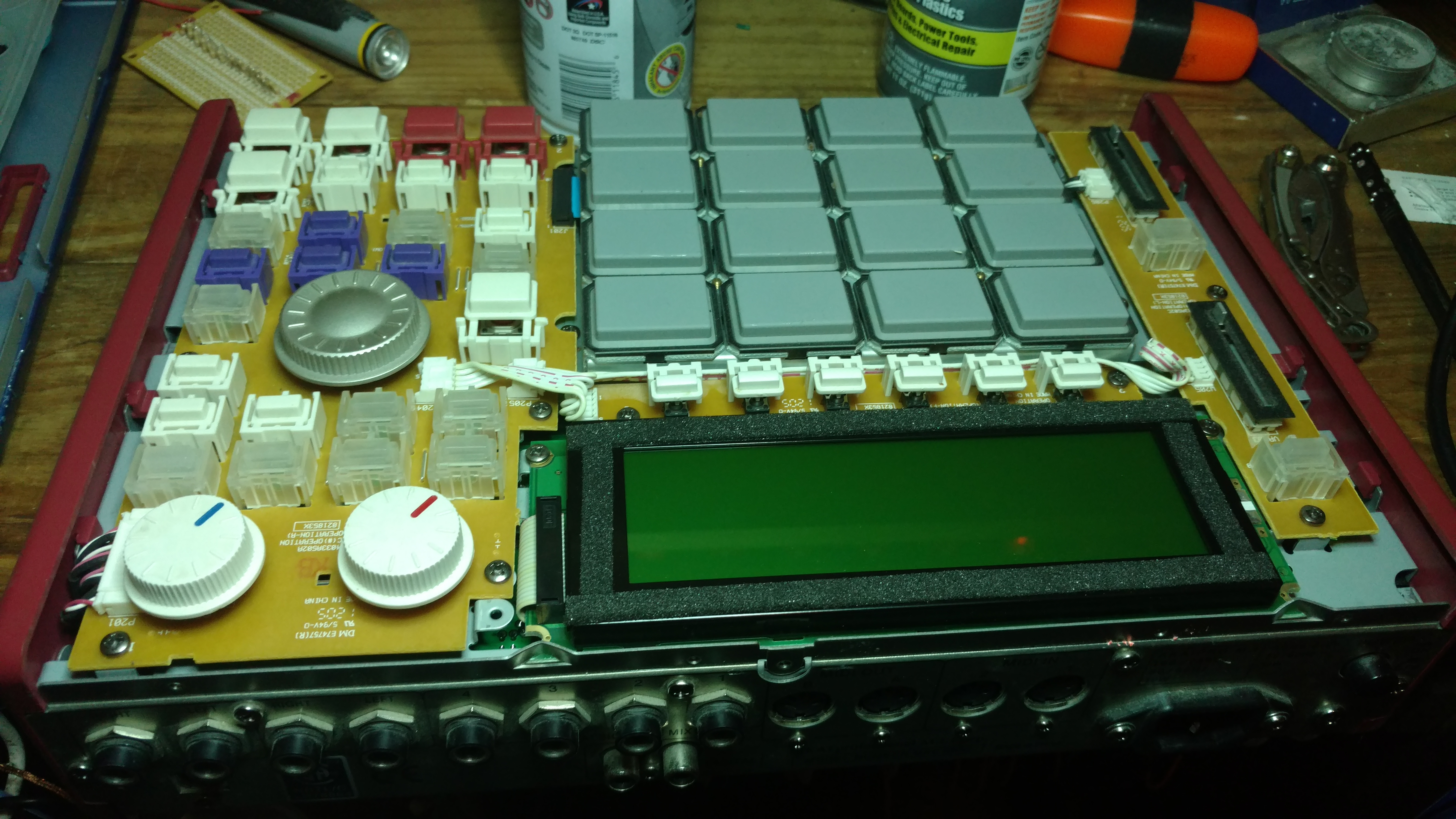
With the top-plate off the body, you can see the rugged build quality inside (this) MPC, especially how the finger-pads are on (mostly) separately-mounted and cushioned from the circuit-board below.
IMG_20170912_182523921
…closer inspection reveals my MPC was getting pretty grimy between the pads.. Gleaned that gunk out with a soft (DRY) toothbrush.

IMG_20170912_183011570_TOP
All the front-panel switches are rugged/colorful plastic bumpers that push (only so far) on little (cheap, fragile) black tactile switches that are mounted on the circuit board. Tactile switches like these are notoriously fussy when they get dirty or abused from excessive force. The bumpers seem to be doing a fine job at preventing force-breakage, so some electronics contact-cleaner should get the gunk out.

TEST:

After cleaning all the dust and electrical contacts, let’s check the “after”


DONE:

Cleaned up and booting up just fine.


Let me know if you have a similar MPC for which you need warranty-voiding service.

Comments

2 responses to “REPAIR: pads and switches on MPC1000 for The PercussioNeuron.”

  1. Benji Avatar

    Hi I’m Benji I have an mpc 1000 and 4 switch’s need replacing of which I can do but I’m stuck with the 6 switch’s that are below the screen I don’t what they are called so don’t know what I’m ordering? Can you help me with the name of the switch? Many thanks.

    1. thepatrickrichardson Avatar

      Hey Benji,
      Sorry for slow response. I’ve been dealing w/ some health issues.
      …Do you need to replace the buttons (plastic bits you touch, if they are broken),
      which is available in sets like this:
      https://www.mpcstuff.com/mpc-1000-bright-white-replacement-button-set-kit/

      OR:

      …do you need to replace the actual switch under the button ?
      https://www.mpcstuff.com/small-tact-switch-for-mpc-under-button/

      email me at
      thepatrickrichardson@gmail.com
      and we can work out the details of ordering parts and/or setting up some bench-service.

      cheers,
      PR.

Leave a Reply to thepatrickrichardsonCancel reply

Discover more from Music Lessons + More w/ ThePatrickRichardson

Subscribe now to keep reading and get access to the full archive.

Continue reading